Small businesses don't need another wallet. They need to stop babysitting their money.
JOBR Wallet gives an owner one place to see cash, move it, decide who can spend it, and stay protected. The guardrails are built in, so control doesn't cost speed.
- Product
- Business Account in JOBR Wallet, mobile and web sign-in
- My role
- Lead / Senior Product Designer
- Worked with
- Product, Engineering, Risk and Compliance
- Timeline
- 2026 · 3 months
Control for
small-business money.
A consumer wallet has one person spending their own money. A business wallet has several people spending money that belongs to someone else. That single difference changes everything about the design: who can act, what a mistake costs, what counts as proof, and where the work happens.
The JOBR Wallet business account sits inside the personal wallet the owner already has, one tap from Personal. From there it does four jobs: see cash at a glance, move money in, out and across borders, control who can spend what, and protect the business when something looks wrong.
I owned the problem definition and the end-to-end UX and UI architecture, from the role model and approval logic to interaction states and the shared design system, and validated the riskiest flows with users. This page walks through the four pillars, the decisions behind them, and what I'd carry forward.
What changes for
the business.
Eight moments in an owner's week where the old way costs time or trust. Flip the switch to see what the design does about each one.
Why business money is a
different design problem.
Consumer wallet
Business wallet
Three people, three definitions of "in control".
"I was the bottleneck for every payment over $500 — my ops manager would text me a screenshot and I'd approve it blind, from wherever I was." — Owner, 14-person catering business, discovery interview
From 14 discovery interviews with SMB owners, finance leads and bookkeepers across retail, food service and professional services (5–40 employees).
One product,
four jobs.
Everything in the Business Account serves one of four things an owner is trying to do.
See
Cash, at a glance
- Dashboard and alerts
- Weekly and monthly cash flow
- Analytics and AI insights
Move
Money in, out and across borders
- Send and request
- Currency exchange with a timeline
- Invoices, links and disputes
Control
Who can spend what
- Roles and thresholds
- Daily limits
- Approval workflow
Protect
Safe by default
- AI-flagged transactions
- Guided account closure
A dashboard that
answers "are we okay?"
The problem
Owners open the app with one question. If answering it takes a tap, a spinner or a report, they go back to the bank portal.
The design
A strict order: the balance, then four color-coded numbers that explain it, then anything that needs action. Approvals and warnings sit above the fold so they can't be missed.
Edge cases
- Low balance warning offers Add Fund inline, or Dismiss
- Suspicious rows are tagged "AI flagged" in the list
- Account details sit in a collapsible section, with copy and share
- Personal and Business switch from one dropdown
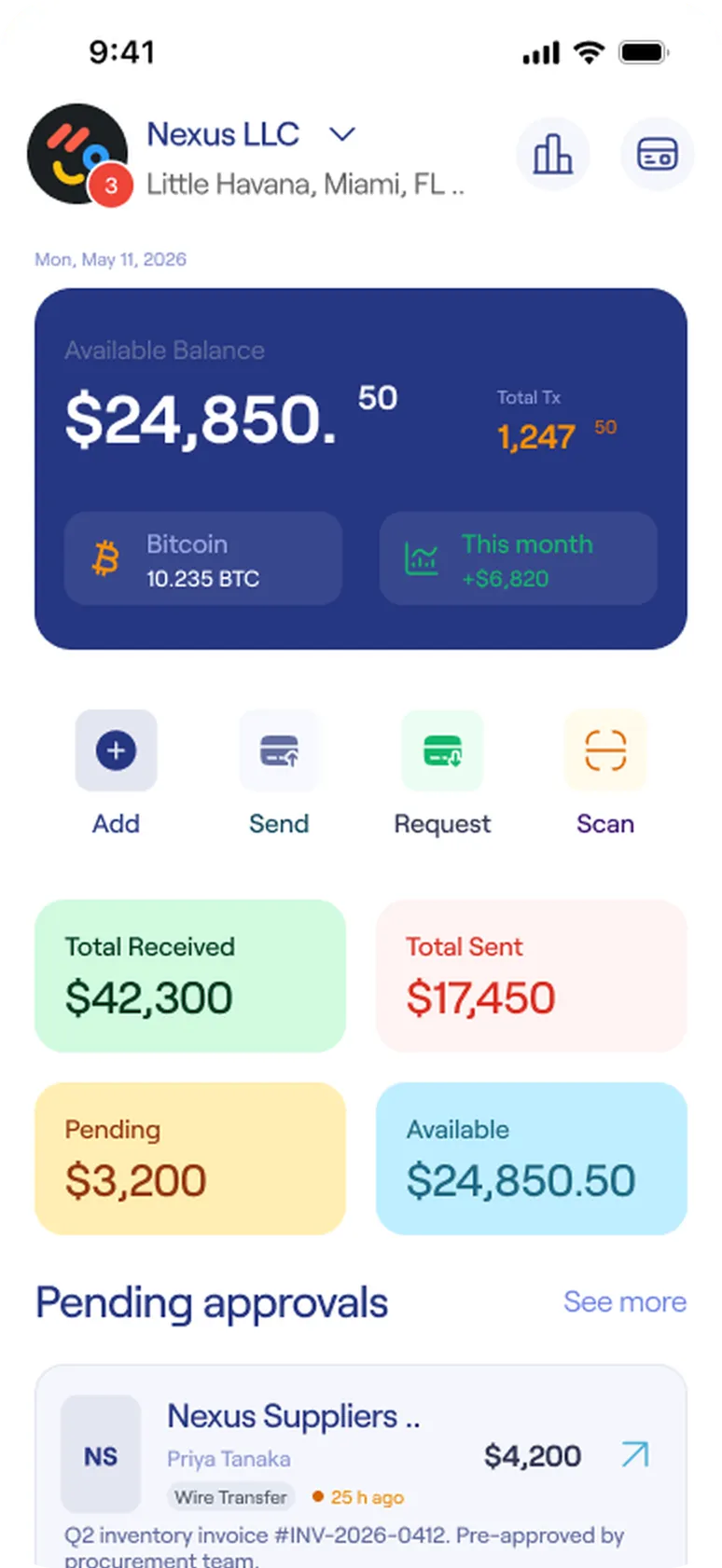
- Balance firstThe number an owner opens the app for, on the largest, darkest surface.
- Four numbers that explain itReceived, sent, pending and available, color-coded and labeled so color never works alone.
- Approvals above the foldDecisions waiting on the owner sit right under the numbers, not in a menu.
Every payment says where
it is and what it costs.
The problem
Business payments carry weight: a fee nobody mentioned, or an invoice that goes quiet because the client disagrees with it.
The design
Sending works like a conversation: pick someone, set an amount, choose speed, swipe to send. Every payment, conversion and invoice then gets a timestamped timeline, so nobody has to ask where it is.
Edge cases
- Instant transfer shows its fee up front (2%, capped at $100). Normal is free.
- Each exchange states the mid-market rate, no markup, and what was saved against a bank
- A disputed invoice has its own resolution path instead of a dead end
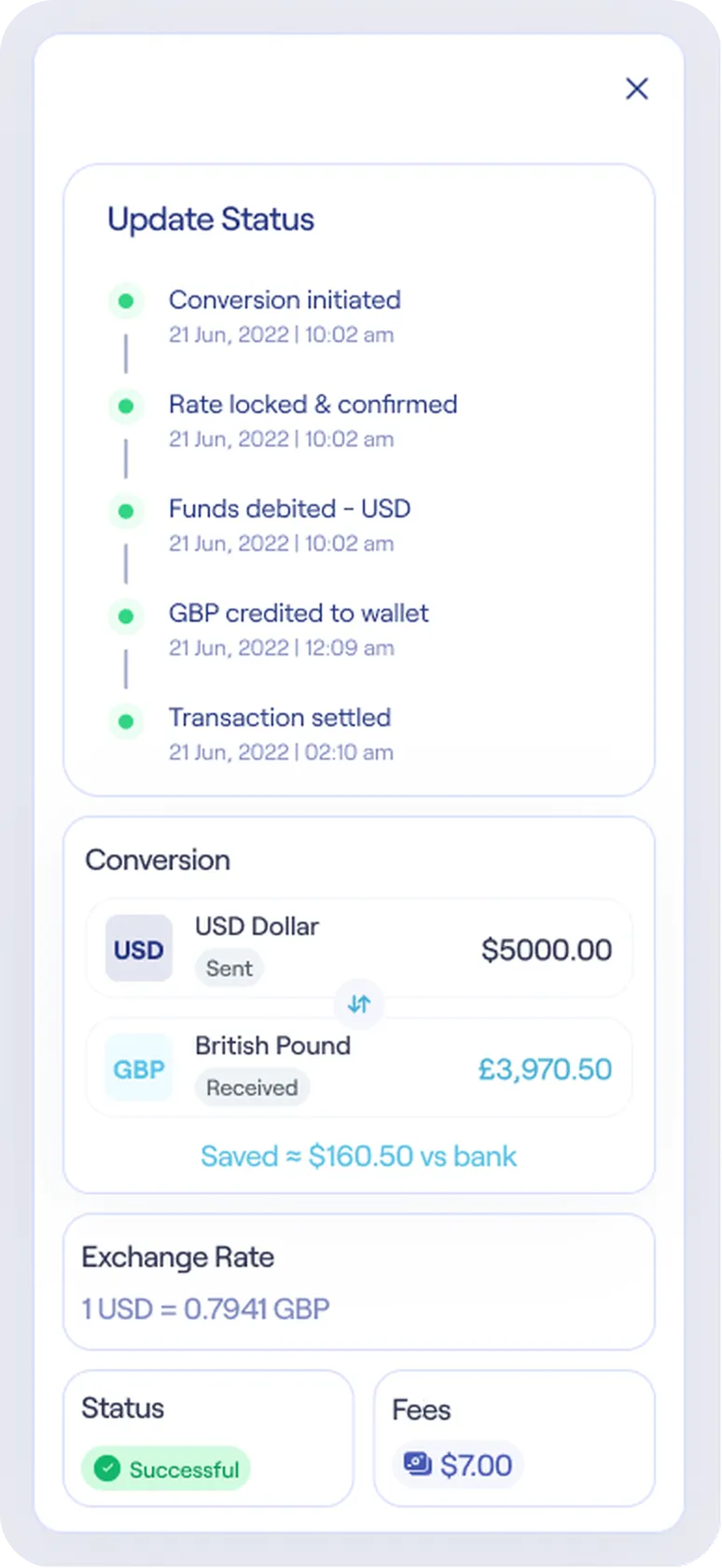
- "Rate locked & confirmed" is a stepThe rate is fixed before any money moves, and the step is timestamped.
- Prove the rate is fair"Saved $160.50 vs bank" turns a number into evidence.
Get paid.
Invoices and disputes under one roof, so cash owed never goes quiet.
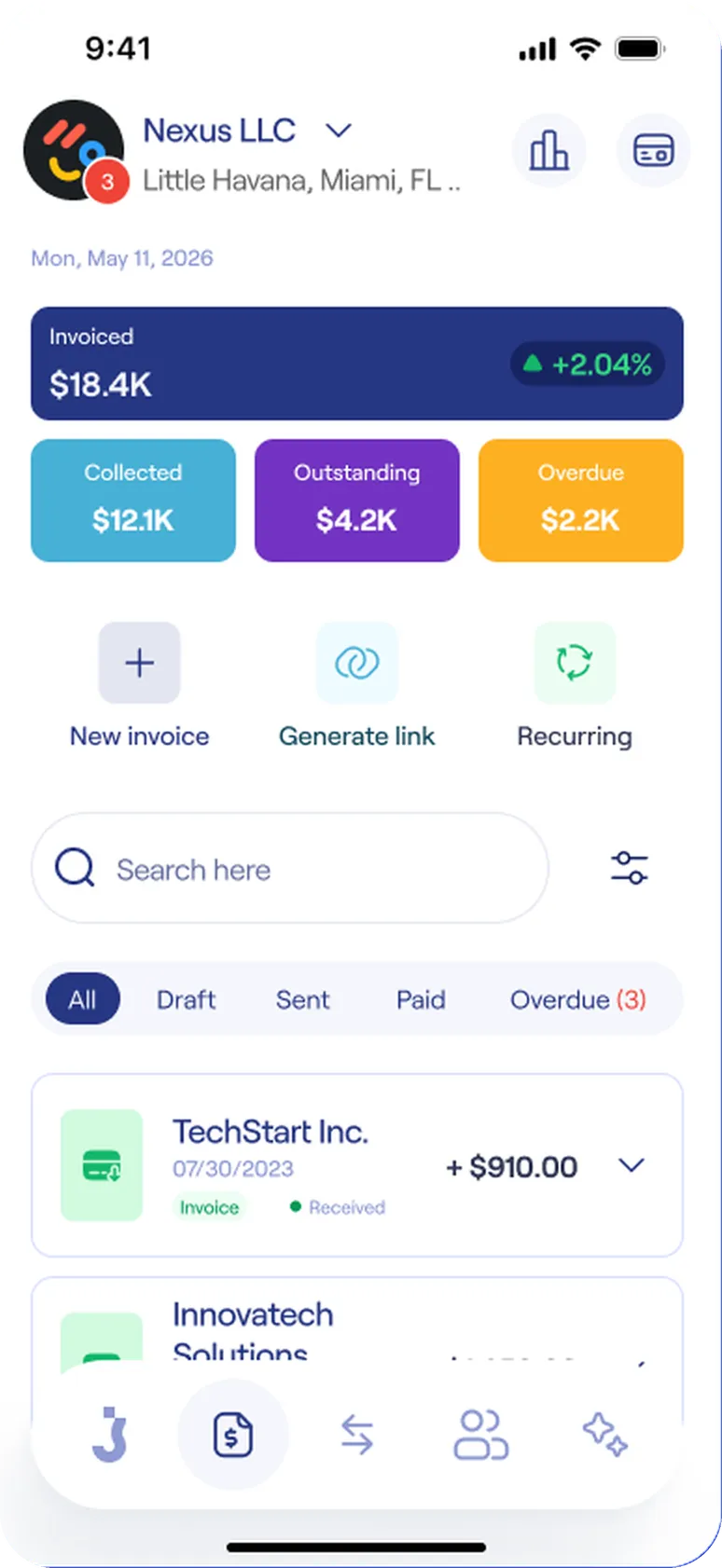
Invoices
- Cash owed at a glanceCollected, Outstanding and Overdue.
- Three ways to billNew invoice, Generate link, Recurring.
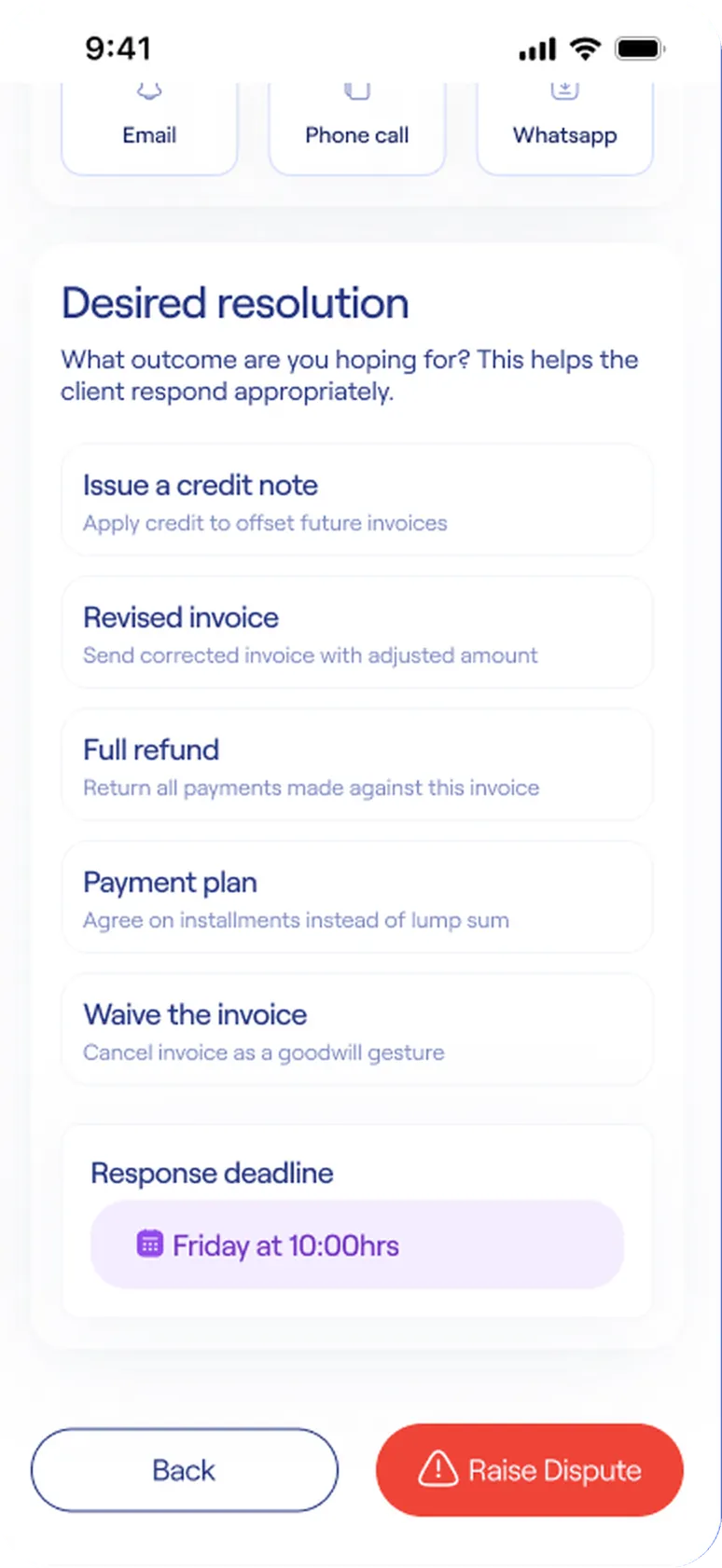
Invoice dispute
- Ask for an outcomeCredit note, revised invoice, refund, plan or waiver.
- A deadline keeps it movingThe response deadline is set before the dispute is raised.
Delegate the work,
keep the final say.
The problem
Owners want their team to pay bills without asking permission every time. Too much friction and delegation is pointless. Too little and one mistake becomes a loss.
The design
Two independent dials. The Finance role sends freely below a $1,000 threshold, and anything above waits in an Admin's queue. Separately, each person gets a daily limit, a per-transaction cap and switches for online and international payments.
Edge cases
- Choosing a role shows exactly what it can and can't do
- The approver sees whether it is a first payment to the recipient
- Declining needs a reason and notifies the requester
- The requester sees a live timeline, with a reminder after 24 hours
Try the approval threshold
A Finance member queues eight payments. Move the threshold to see what goes through and what waits for an Admin. At or above the threshold, a payment is held.
The setup and the decision.
How a role is chosen and limited, and how one payment travels from request to approval.
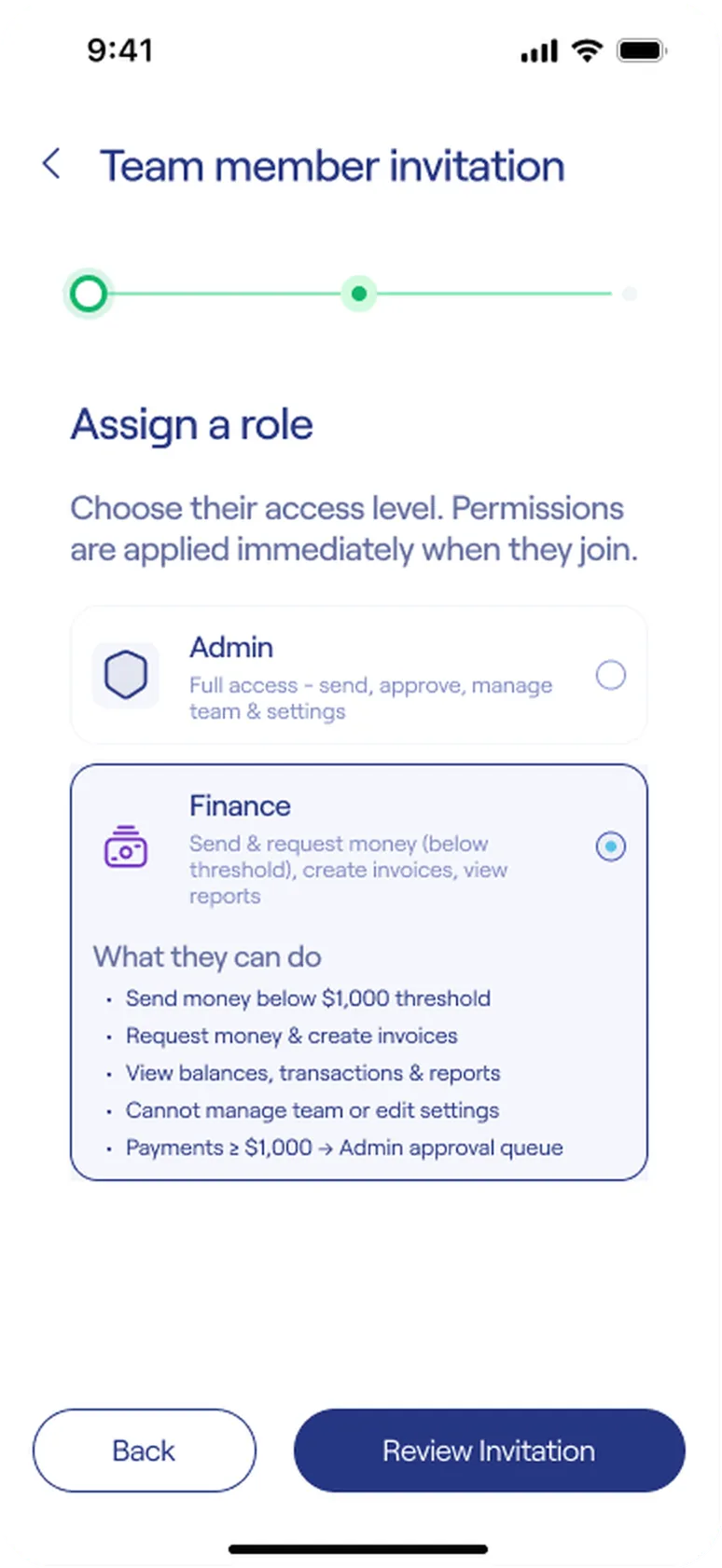
Assign a role
- Permissions at the point of choiceWhat the role can and can't do.
- The rule, in wordsPayments of $1,000 or more go to the Admin queue.
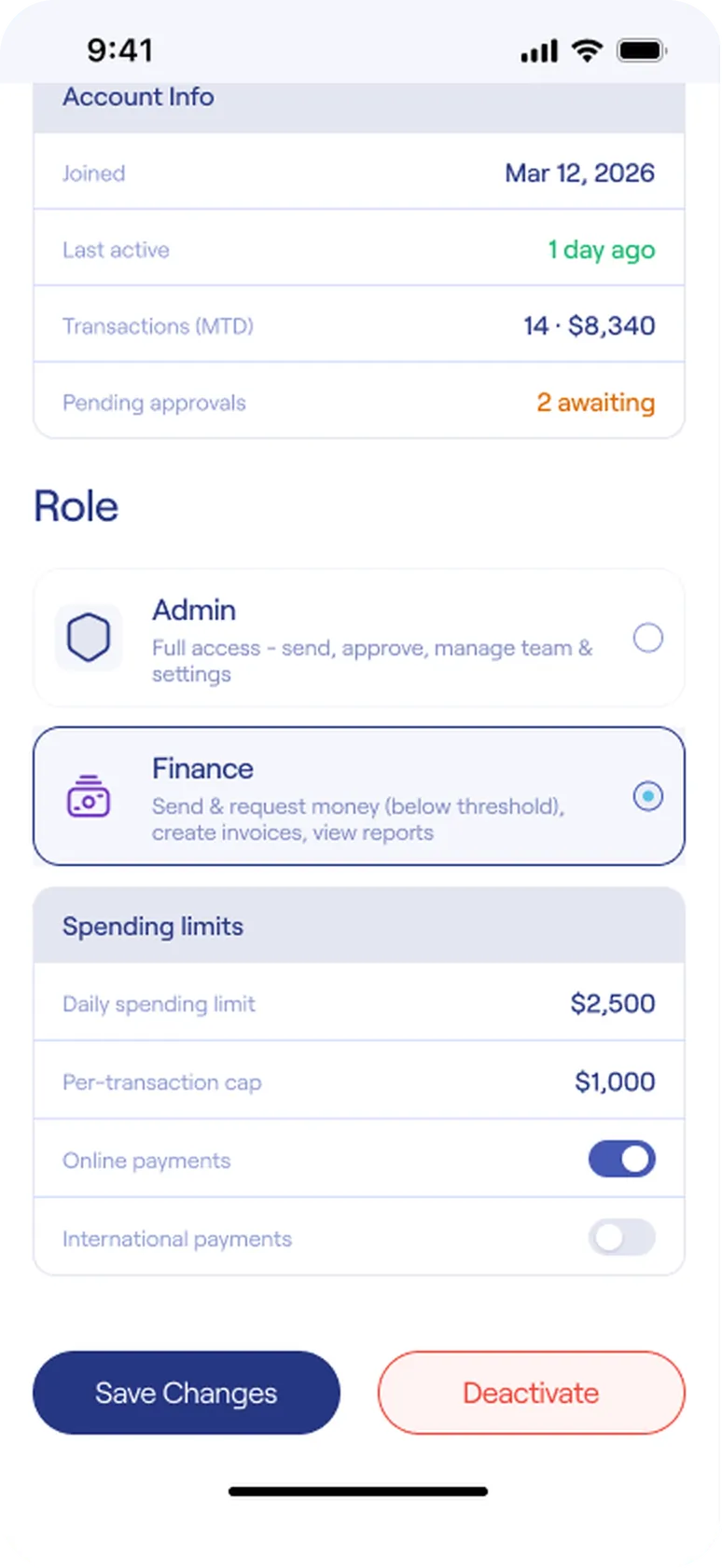
Spending limits
- A second, separate dialDaily limit, per-transaction cap, and switches for online and international payments.
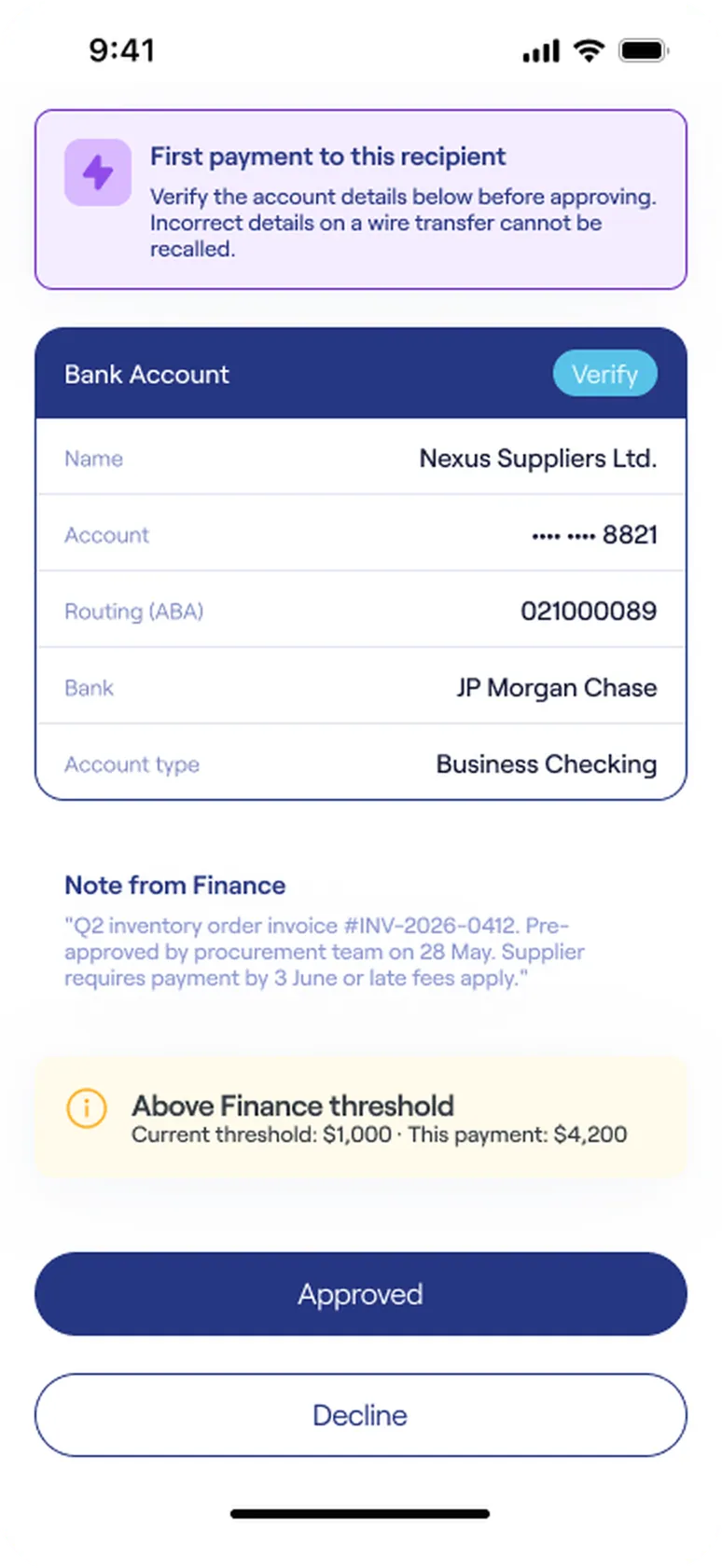
The decision
- Say what is riskyFirst payment to this recipient. Wires can't be recalled.
- Verify in placeBank details with a Verify tag.
- Show the ruleAbove Finance threshold: $1,000 vs $4,200.
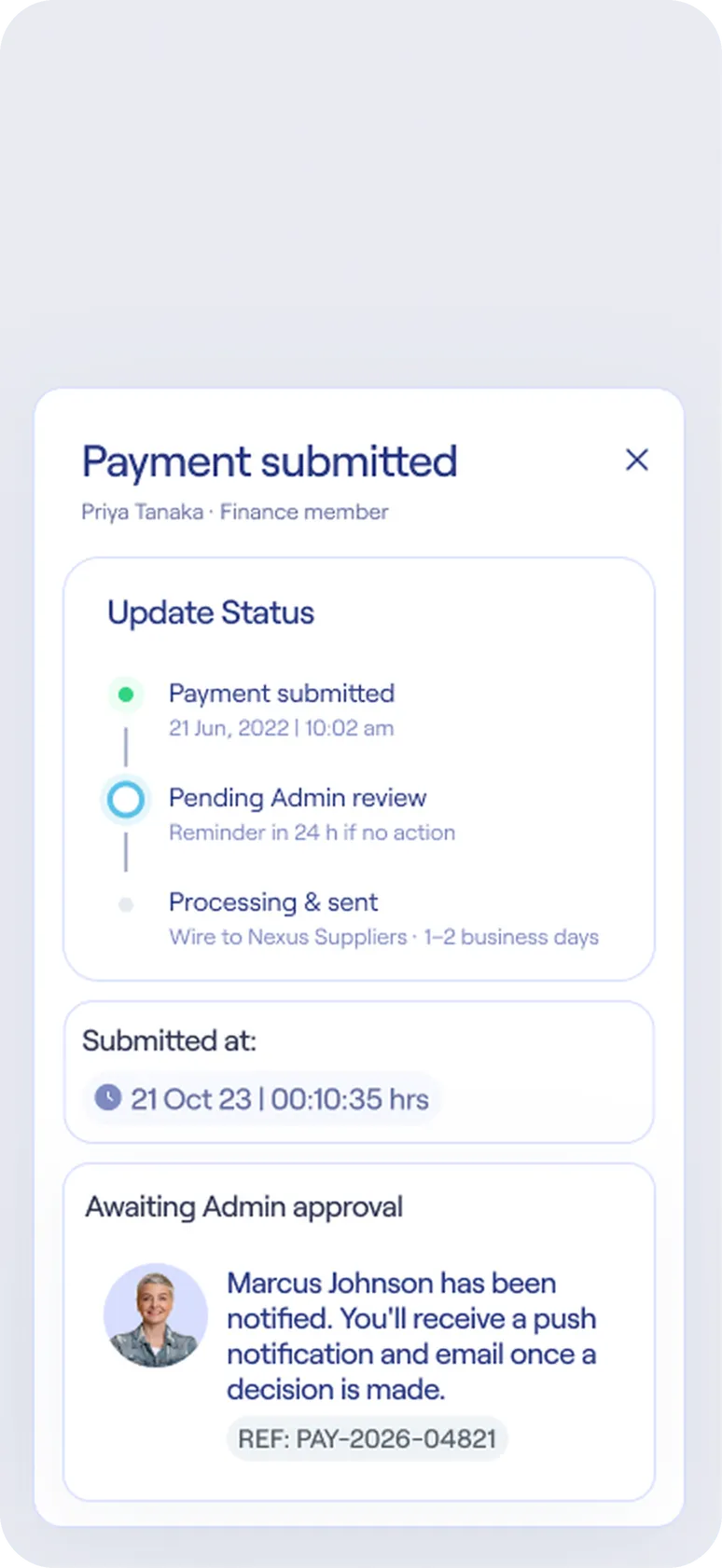
The requester's view
- A promise, not a waitA reminder goes out after 24 hours if no one acts.
- Who was toldThe approver, by push and email, with a reference.
Safe by default, honest
about the risky things.
The problem
Fraud and irreversible actions are the moments a business owner most needs a calm, clear screen, and the moments most products get loud and vague.
The design
Say what the system saw, offer two clear actions, and confirm what happens next. Risky exits, like closing the company account, are slowed on purpose with a checklist, a code and a typed phrase.
Edge cases
- AI flags show the reasons: location mismatch, unknown device, unusual time
- "It was me" verifies the payment and teaches the security model
- Closing the account states what will and won't happen, including that the personal wallet is untouched
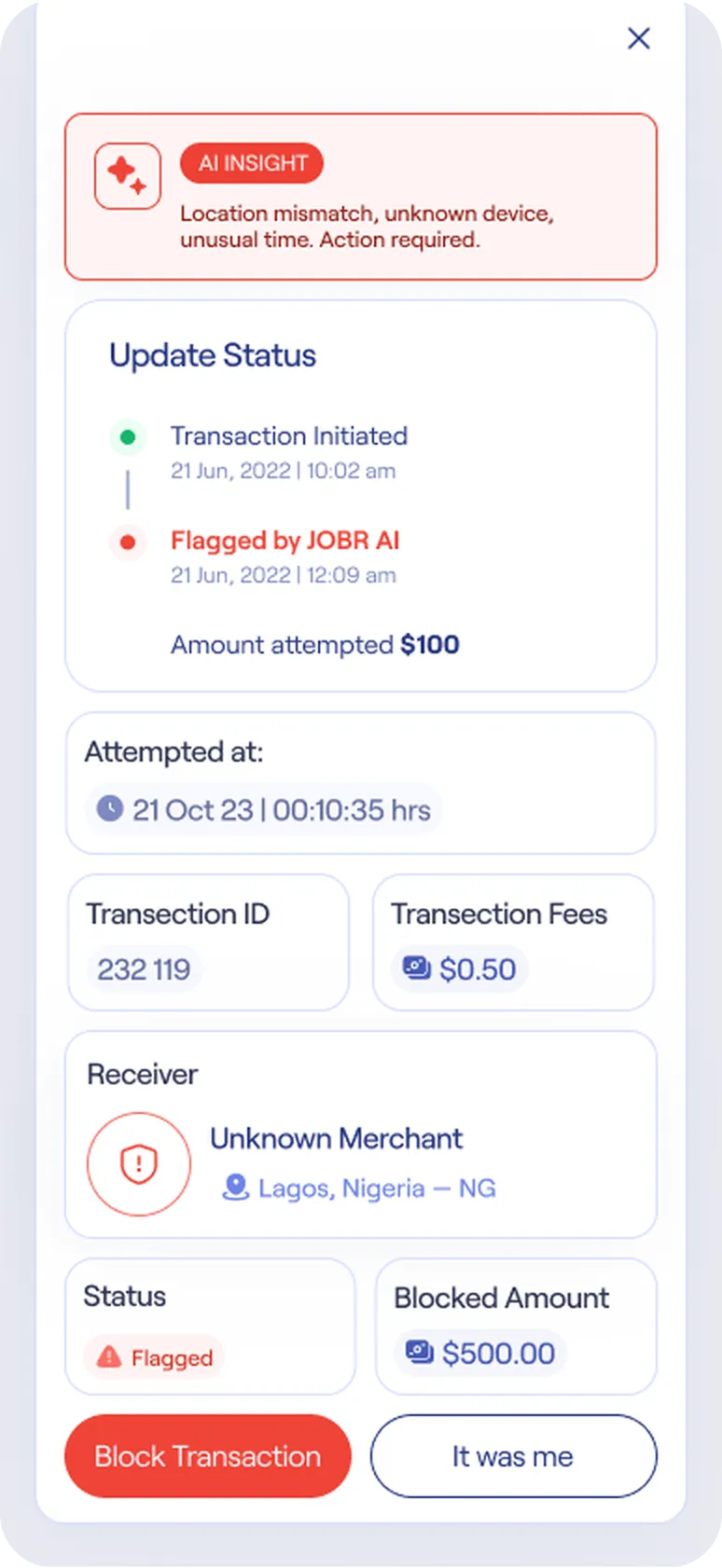
When something looks wrong
- Reasons firstLocation mismatch, unknown device, unusual time.
- Two clear actionsBlock Transaction, or It was me.
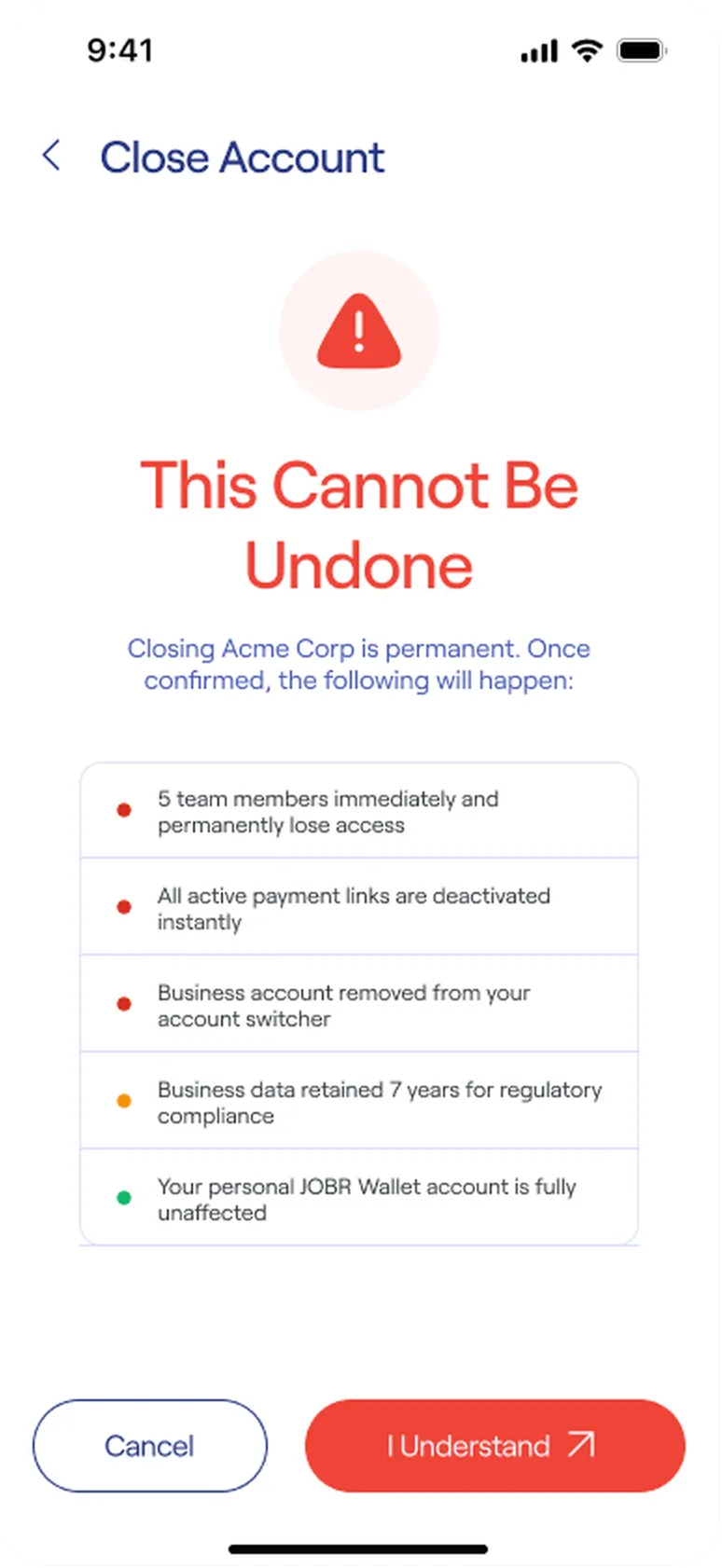
When it can't be undone
- Consequences, colored by severityThree red, one amber, one green. The last says the personal wallet is untouched.
What I chose,
and what I ruled out.
Where the design took a position, and why. Most of these were live debates with Product and Engineering — especially how hard to block a first-time wire transfer, and how much friction account closure should carry before it felt like the team was trusting the guardrails over the owner.
Inside the personal wallet
Owners are already signed in and verified. A dropdown switches context in one tap, and closing the business leaves the personal account untouched.
Reuse personal verification
The company flow shows person, photo ID and selfie already ticked, so onboarding only asks about the company.
Two separate dials
A threshold decides which payments need a second pair of eyes. Limits decide how much a person can spend at all. Different risks, different controls.
Context beside the button
The list allows quick action, but the detail screen puts the first-payment warning, verified bank details and the finance note next to the button.
Show the fairness
"Mid-market rate, no markup" sits under the title, and the result says what was saved against a bank.
Guided, not a button
Every open item has to be resolved, then confirmed. The stakes are one-way, so the friction is too.
Testing, results,
and what changed.
What I tested
- Threshold vs limits. Do Admins understand these are two separate controls?
- Approve from a phone. Is the detail screen enough to decide?
- Instant vs Normal. Do people notice the fee before they swipe?
- Dispute flow. Can an owner settle a dispute without help?
- Company verification. Where do people stall with documents?
Method: 8 participants (4 owners, 2 finance/ops managers, 2 bookkeepers) across two rounds on a mid-fidelity Figma prototype, each running 5 scenario-based tasks: approve a held payment, send an international payment, raise an invoice dispute, assign a role, and verify a business.
| Flow | V1: what confused people | V2: what changed |
|---|---|---|
| Approval decision | Approvers couldn't tell if a payment was risky without opening a second screen | Moved the first-payment warning and the threshold banner onto the decision screen itself |
| Transfer speed | Participants missed the Instant transfer fee until the final confirm step | Showed the fee directly on the Instant/Normal choice, before amount entry |
| Invoice dispute | Given a free-text box, owners didn't know what outcome to ask for | Replaced free text with five named outcomes (credit note, revised invoice, refund, plan, waiver) |
| Business verification | Uploading all 3 documents on one screen felt heavy; two participants stopped there | Split into one document per step with a progress indicator |
| Outcome | Before | After |
|---|---|---|
| Time to open a business account | 12–15 min, paper forms and manual review | Under 5 min average, in testing |
| Time to approve a payment | Hours, over text or email | Under a minute from the decision screen |
| Overdue invoices | Found out when the client mentioned it | Flagged automatically, with reminders sent |
| Drop-off during verification (V1 test) | 2 of 8 participants stalled at the document step | 0 of 8 stalled after splitting into steps (V2 retest) |
In their words: "I don't miss every payment anymore — I only see the ones that actually need me." — Business owner, beta test participant